
Managing Wilayas And Zones
Managing Wilayas and Shipping Zones
Shipping in Algeria is fundamentally different from shipping in any market WooCommerce was designed for. There are no postal codes. There are 58 wilayas. Each has its own delivery cost, and most stores offer two options per wilaya: Home Delivery and Stop Desk pickup. The default WooCommerce experience expects you to manually create 58 shipping zones, add two methods to each, and set 116 prices — an afternoon’s work, easy to get wrong, and almost guaranteed to drift out of date. Yaxii COD ships with a one-click generator built into WooCommerce’s own settings: pick your default Home Delivery and Stop Desk prices, click Generate, and 58 zones with 116 delivery methods appear in seconds. No third-party shipping plugin. No spreadsheet. No support ticket when a wilaya is missing.
Where to find the generator
In the WordPress admin, go to WooCommerce > Settings > Shipping, then click Yaxii Zones at the top of the page. This is the dedicated section the theme adds to your standard WooCommerce shipping settings — not a separate page, not a separate plugin.
What the generator creates
| Item | What it is |
|---|---|
| 58 shipping zones | One zone per Algerian wilaya, properly named in French and Arabic (for example, “16 Alger – الجزائر”). |
| Home Delivery method | A Flat Rate method in each zone titled “Livraison à domicile” (or your custom title), priced at your chosen default. |
| Stop Desk method | A Flat Rate method in each zone titled “Point de retrait” (or your custom title), priced at your chosen default — typically cheaper than Home Delivery. |
Configurable generator options
| Option | What it does |
|---|---|
| Create Home Delivery | Whether to create the Home Delivery method in each zone. Almost always on. |
| Create Stop Desk | Whether to create the Stop Desk method in each zone. Turn off if you do not partner with desk-delivery couriers. |
| Home Delivery title | The label customers see for Home Delivery. Default: “Livraison à domicile”. Translate into Arabic or English if your store’s primary language differs. |
| Default Home Delivery price | The starting price applied to Home Delivery in every wilaya (default 600 DZD). You can edit individual wilaya prices after generation. |
| Stop Desk title | The label customers see for Stop Desk. Default: “Point de retrait”. |
| Default Stop Desk price | The starting price for Stop Desk in every wilaya (default 400 DZD). |
Generating the 58 zones
- 1Open WooCommerce Shipping settingsGo to WooCommerce > Settings > Shipping and click Yaxii Zones at the top of the page.
- 2Pick your delivery methodsTick Create Home Delivery, Create Stop Desk, or both. Most COD stores tick both.
- 3Customize the method titlesChange the Home Delivery and Stop Desk titles if you want them to appear in a different language or wording on the storefront.
- 4Set your default pricesEnter the price you charge in the average wilaya for each delivery method. This becomes the starting point for all 58 zones — you can fine-tune individual prices afterward.
- 5Click Generate ZonesThe generator runs in a few seconds. When it finishes, you see a confirmation showing how many zones were created.
- 6Verify the resultReturn to the main Shipping Zones list (WooCommerce > Settings > Shipping > Shipping Zones). You see all 58 wilayas listed, each with the methods you selected.
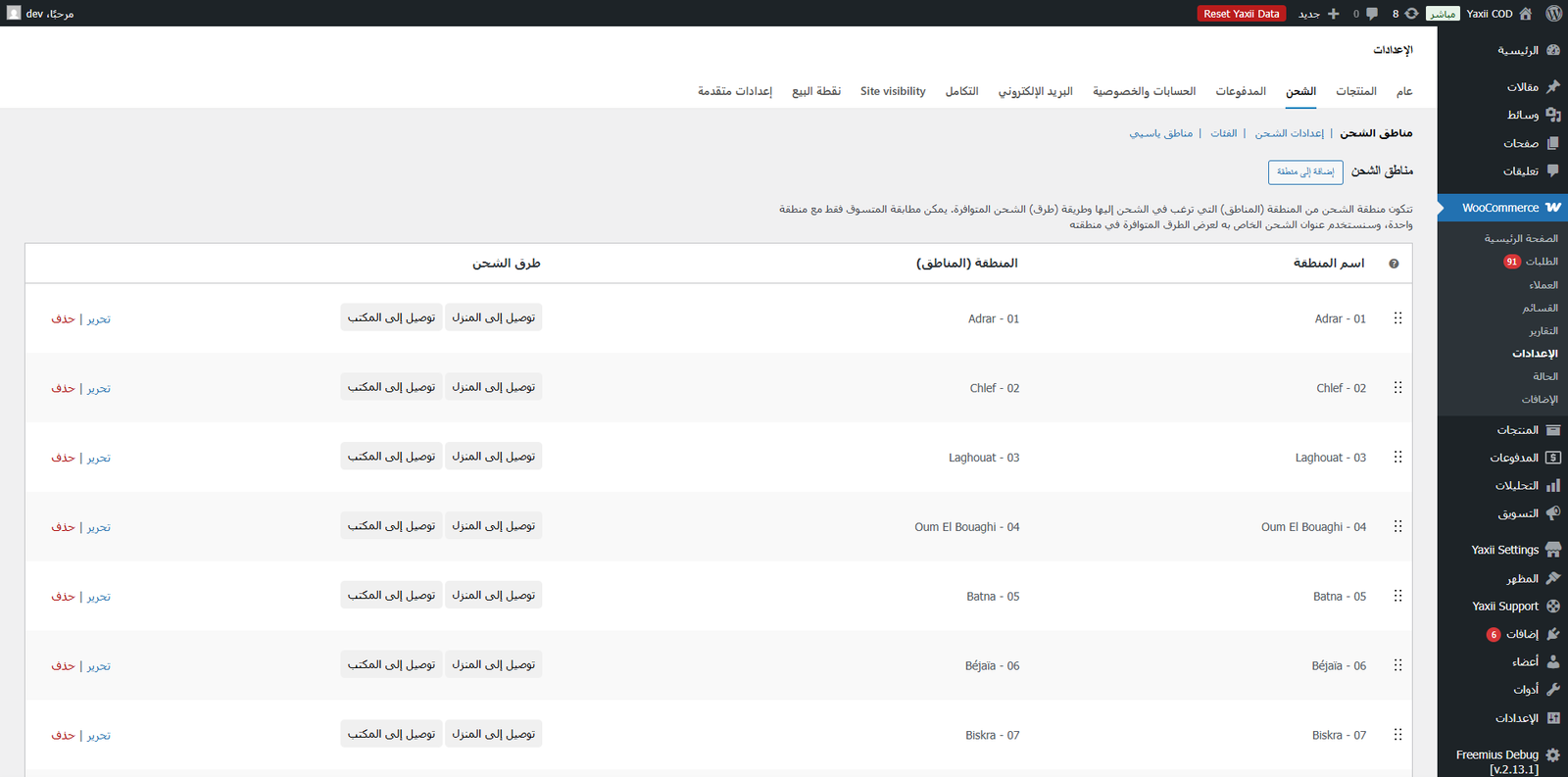
Adjusting prices for individual wilayas
The default prices you set in the generator are a starting point. In real Algerian logistics, delivery to Tamanrasset costs more than delivery to Alger, and the difference can be significant. To fine-tune:
- 1Open the Shipping Zones listGo to WooCommerce > Settings > Shipping > Shipping Zones.
- 2Click the wilaya you want to adjustEach row is a wilaya. Click the row to open its zone editor.
- 3Edit the method priceHover the Home Delivery or Stop Desk method and click Edit. Change the cost field to the wilaya-specific price.
- 4Save changesClick Save. The new price applies to all new orders from that wilaya immediately.
Re-running the generator
The generator is safe to run multiple times. It checks which zones already exist and only creates the ones that are missing — so if you delete a single wilaya by accident, you can re-run the generator and it will recreate only that zone, leaving all your other custom prices untouched.
You’re All Set!
Congratulations — your Yaxii COD store is fully configured and ready for business. You have installed and licensed the theme, run the onboarding wizard, set your brand colors and typography, configured your header and footer, connected your marketing pixels, secured the store against desktop traffic, built a homepage with the sections that fit your products, designed a focused product page, optimized the cart for upsells, tuned the COD Fast Checkout form, built a high-trust Thank-You page, and provisioned delivery for all 58 Algerian wilayas.
Place a real test order — on a real phone, on a real 4G connection — and walk the entire customer journey end to end. Confirm the courier price is correct in your wilaya, confirm the Thank-You tokens replace with real data, confirm the order arrives in your WooCommerce admin. When that test order looks right, your store is open. Good selling.